

| **NOTE - MDaemon administrators storing accounts in an Open Database (ODBC) - Please change the account database type back to the USERLIST.DAT file before following these steps. The ODBC data source can be reconfigured once MDaemon is running on the new server/OS. |
- The existing MDaemon service must be removed to move MDaemon to a new machine.
To remove the MDaemon service:
- Select Setup
- Select Preferences
- Select Windows Service
- Select Remove Service
- Click OK in the Service was successfully removed pop-up.
- Click OK in the Preferences window.
- Select Yes when MDaemon asks to restart.
- MDaemon will now restart running as an Application.
- Follow the next steps to deactivate MDaemon and any other MDaemon plug-ins.
**NOTE - Deactivation is necessary to avoid any potential activation issues.
To deactivate your Alt-N Software
- Select Help
- Select Activate Your MDaemon Software
- Select Deactivate MDaemon...
- The SMTP, POP3, IMAP, and Webmail servers in the Servers section of MDaemon will turn red (inactive).
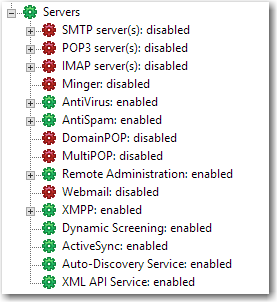
- Proceed to deactivate any additional MDaemon plug-ins that are activated on the server using the above steps.
- Open Windows Explorer and copy the entire MDaemon directory to the new directory on the new server.
- Install the same version of MDaemon that was installed on the previous server.
**NOTE - The server configuration, user directories, and other modifications are NOT changed when running the installer.
Click here for prior versions of MDaemon
**NOTE - Please be sure the MDaemon service/application is not running on the new server.
|
Additional Comments If you are changing your IP address(es) in addition to moving, the MDaemon.ini, Domains.dat, and/or Gateways.dat in the \MDaemon\App directory will need to be updated with the new IP address(es). |
Courtesy / Reference: The above article is the copyright of the respective authors and content writers from the following reference URL:
https://knowledge.mdaemon.com/move-mdaemon-using-the-same-directory-path