

(Minimum Version: 1.8.6.0) TSPrint is mostly used with two types of TSPrint printer: TSPrint Default and TSPrint Printer. The TSPrint Default printer will print everything to the local default printer without any dialogs. The TSPrint Printer in return will show each time a dialog where you can select the desired printer and its settings.
Now sometimes you would like to create a new printer and tell TSPrint to automatically transfer the printjob to another local printer besides the default printer.
This can be done with the new type of TSPrint printer named TSPrint User Defined. By default the TSPrint installation does not create such a printer.
To map a local printer to a TSPrint printer log-in to your terminal server and go to:
Start -> Programs -> TerminalWorks -> TSPrint Server -> Print Manager
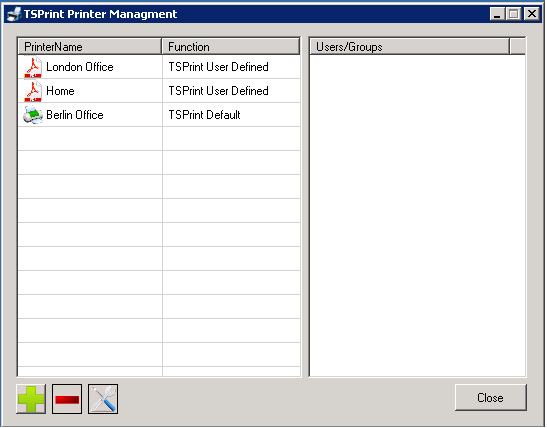
This is the Printer Manager of TSPrint which enables you to create new TSPrint printers and assing them to different users or groups.
Now to create a new user defined printer which we can map to a local printer we press the green plus button on the lower left corner of the dialog. This will show us the following dialog:
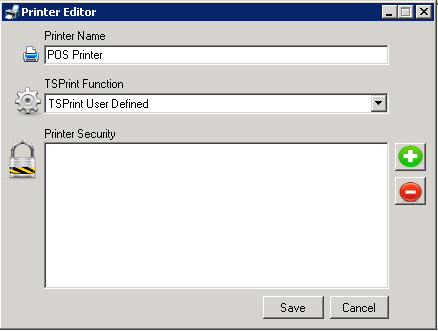
The new printer dialog enables to define the name and functionality of the tsprint printer.
Enter the desired name of the printer and under TSPrint Function select TSPrint User Defined. Now under the Printer Security field you can add different users or groups which should be able to see and print to this printer. If you leave this field empty then only YOU and the server Administrator will see this printer and be able to print to it.
After we save the new printer it should appear as any other printer in our list:

Now the first time you print to this printer a dialog will show up which will ask you to select the desired local printer. If another user on the terminal server prints to the same printer he will also receive this dialog the first time and he will able to select his local printer. By printing on the terminal server to the user defined TSPrint printer TSPrint will check if the user has selected a local printer to which print jobs should be transfered. In case he has not the earlier mentioned dialog will show up.

Here you select the desired local printer to which the server printer should be mapped to.
Now print to the printer and your print job will automatically be transfered to the earlier selected local printer. Using this scheme you can for examle create a new printer and assign to him form sizes of your local POS printer and each time when printing on the terminal server the print job with the correct form size will be printed on your local POS printer.